Quick answerIn concentrated liquidity (Uniswap v3/v4, Orca), swap fees are not added to the position automatically: they accumulate separately and must be claimed (collected). Once claimed, fees can be kept or compounded (added back to the position so they earn fees too). Removing liquidity can be partial or full; with Zap Out the proceeds are swapped straight into one token such as USDC or SOL.
| Action | Result |
|---|
| Claim fees | Fees go to your wallet, position stays |
| Compound | Fees are added to the position |
| Partial removal | Part of the capital plus fees return to your wallet |
| Zap Out | Everything arrives as a single token |
Claim liquidity provider fees, compound them back into the position, add liquidity, and remove liquidity partially or fully — including Zap Out to a single token like USDC or SOL.
How to claim fees and remove liquidity is a daily skill for liquidity providers. On BaniPool every position action lives on one page: claim fees, compound (add fees back into the position), add liquidity, remove partially or fully, Zap Out to a single token, and rebalance. This guide applies to Uniswap v3/v4, Aerodrome, Orca, Raydium CLMM and Meteora positions.
How to claim LP fees
- Open Profile → click your position.
- Check Unclaimed fees (read directly from the position contract).
- Click Claim fees and sign. Fees go to your wallet.
On Uniswap v4, accumulated fees are also sent to your wallet automatically when you add or remove liquidity. On Raydium CPMM and PumpSwap, fees accrue into the LP token value — there is no separate claim.
Compound fees
Compounding adds fees back into the position so they earn fees too. When is it worth it? When fees are much larger than gas. On cheap networks (Base, Arbitrum, Solana) you can compound often; on Ethereum, less often. It can also run automatically — see automated LP rebalancing.
Add liquidity to an existing position
Click Add liquidity:
- Zap In — one token is enough; BaniPool computes the balancing swap, then swaps and adds in one transaction.
- Manual — enter both tokens at the pool ratio.
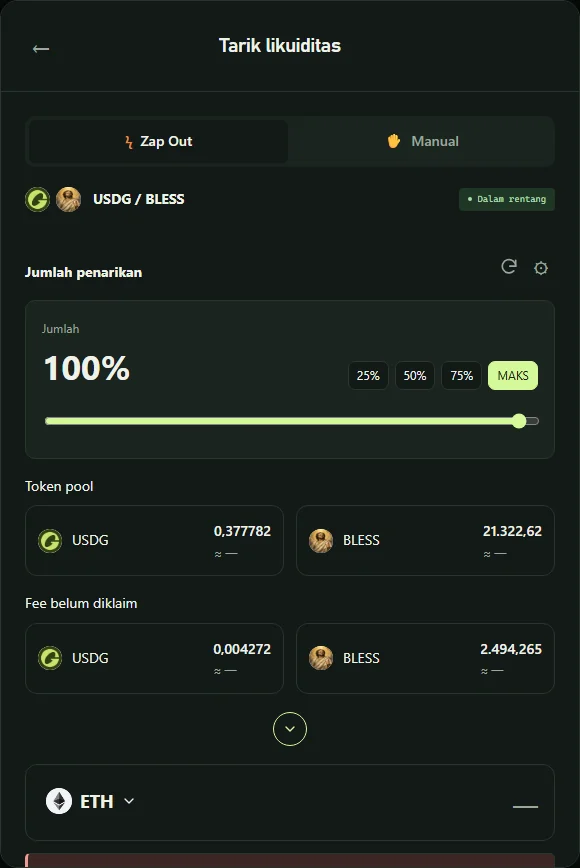
The ↻ button re-routes and reloads balances; ⚙ opens slippage (and private mempool) settings.
How to remove liquidity
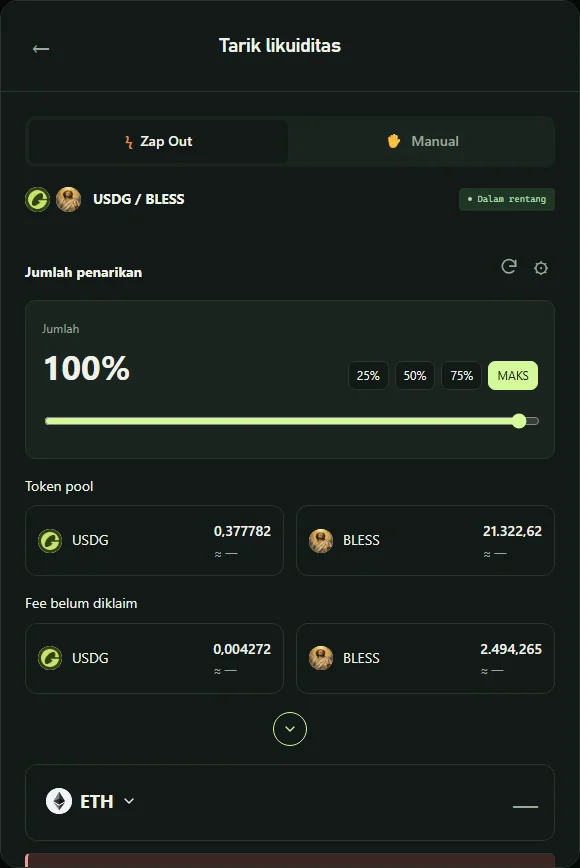
Click Remove liquidity, choose 25%, 50%, 75% or MAX, then:
- Zap Out — withdraw and swap everything into one token of your choice (e.g. USDC, ETH or SOL — on Solana, any token with a route);
- Manual — receive both tokens as they are.
The dialog shows the pool tokens and unclaimed fees included in the withdrawal. On Solana, closing a position also refunds account rent (e.g. ~0.042 SOL for Meteora DLMM).
Important tips
- The Zap route is chosen from all candidates by best final output. If a pool is too thin, simulation stops with a clear message — use Manual or another target token.
- Use a private mempool for large Zap Outs: Jito on Solana, private RPCs on Ethereum/BNB — see what is a sandwich attack.
- The position NFT approval to the Zap contract can be revoked anytime from the position page.
FAQ
When is the best time to claim fees?
When accumulated fees are well above the gas cost. On L2s and Solana, weekly is fine; on Ethereum, wait for larger amounts.
Does partial withdrawal reduce future fees?
Future fees are proportional to the liquidity that remains.
Why is my Zap Out output smaller than the position value?
There is a swap: pool fees, price impact and slippage. The breakdown is shown before you sign.