Quick answerTo connect a wallet such as MetaMask, Rabby, Phantom or Solflare to a DeFi app, click Connect wallet, choose the wallet and sign a login message — signing this message is free (no gas) and grants no permission to move funds. On mobile, use WalletConnect or the wallet app's built-in browser. Always check the site address before connecting, and never enter your seed phrase on any website.
| Wallet | Networks |
|---|
| MetaMask, Rabby | EVM (Ethereum, Base, BNB Chain, etc.) |
| Phantom, Solflare | Solana (Phantom also EVM) |
| WalletConnect | Mobile wallets |
How to connect MetaMask, Rabby, Phantom, Solflare or WalletConnect on mobile to BaniPool: gasless login, EVM + Solana in one session, and wallet safety tips.
How to connect a MetaMask or Phantom wallet to a DeFi app is simple — and it is exactly where many users get phished. On BaniPool, login is just a message signature: it costs no gas and grants no transaction permission. This guide covers connecting EVM wallets (MetaMask, Rabby, Coinbase Wallet), Solana wallets (Phantom, Solflare, Backpack), WalletConnect on mobile, and how to stay safe.
1. Make sure you are on the right site
Check the address bar: banipool.com. Phishing sites use look-alike names. Bookmark the site and open it from there.
2. Click Connect wallet
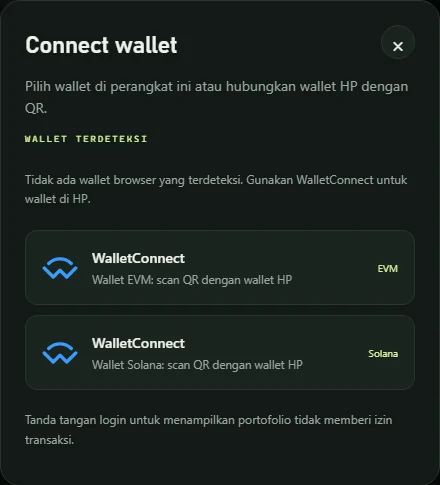
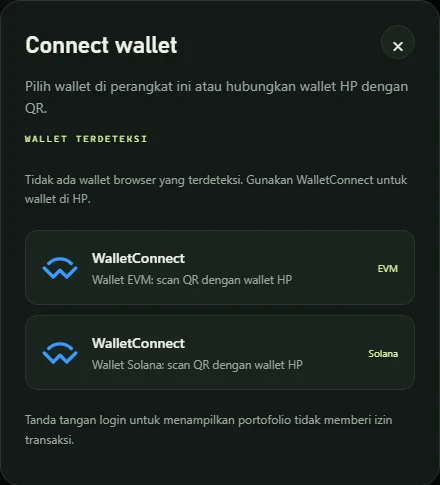
The Connect wallet button is at the top right. The dialog shows:
- Detected wallets — browser extensions: MetaMask, Rabby, Coinbase Wallet, Phantom, Solflare, Backpack and more. Solana wallets are labeled "Solana".
- WalletConnect · EVM and WalletConnect · Solana — for mobile wallets: scan the QR code with your wallet app.
3. Sign the login message
Your wallet asks you to sign a Sign-In with Ethereum or Sign in with Solana message. Check that the domain is banipool.com, then sign. Your address appears at the top right.
The login signature is not a transaction: no tokens move, no gas is spent, and no approval is granted.
Connect EVM and Solana wallets together
After logging in with MetaMask, open the wallet dialog again and add Phantom (or the other way around). Both stay active in one session:
- Solana pages use the Solana address, EVM pages use the EVM address;
- your Profile merges LP positions from both;
- each wallet can be removed separately with Remove.
Connecting on mobile
- Open banipool.com in your wallet app's built-in browser (MetaMask, Phantom, Trust Wallet, Bitget Wallet) — the wallet is detected automatically.
- Or use WalletConnect from a regular browser. For Solana-only wallets choose WalletConnect · Solana so you are not asked to add an EVM network.
- If login hangs for more than 40 seconds, close the wallet prompt and pair again.
Wallet safety tips
- Never enter your seed phrase on any website. BaniPool never asks for it.
- Read every wallet prompt: login is a plain text message; transactions show the amount, network and contract address.
- Token approvals on BaniPool are always for the exact transaction amount, never unlimited.
- Phantom sometimes warns about domains it does not know yet. That is a domain rating, not the transaction content — check the wallet preview before continuing.
- Click Logout when done, especially on shared devices.
FAQ
Can connecting my wallet get my funds stolen?
Connecting and signing a login message cannot move funds. Funds only move through transactions you approve — so always read each request.
Why a signature instead of a transaction?
A signature proves you own the address at no cost. BaniPool can then show your positions and prepare transactions for you to approve.
Which wallets are recommended?
For EVM: MetaMask or Rabby. For Solana: Phantom, Solflare or Backpack — all support "sign only", which the Solana private mempool needs.