Quick answerTo check LP positions and wallet PnL, enter the wallet address (EVM or Solana) into a DeFi portfolio tracker that reads positions directly from the blockchain. Look at the position value, unclaimed fees, in-range or out-of-range status, position age and profit or loss since opening. Because the data is public on-chain, any wallet can be checked without logging in.
| What to check | Meaning |
|---|
| Position value | Current value of the tokens in the position (USD) |
| Unclaimed fees | Swap fees ready to claim |
| Range status | Out of range = earning no fees |
| PnL | Profit or loss including fees and price changes |
Track liquidity provider positions and PnL for any wallet across 10 networks: value, unclaimed fees, range status, position age, and the history of closed positions.
Tracking LP positions and wallet PnL across many networks usually means opening five different sites. On BaniPool, one wallet profile shows token balances and liquidity provider positions from 9 EVM networks and Solana at once — for your own wallet or any wallet. Viewing a profile requires no login and grants no access to the wallet.
How to check any wallet's LP positions
- Open Find wallet.
- Paste an address (0x… or a Solana address) and click View profile.
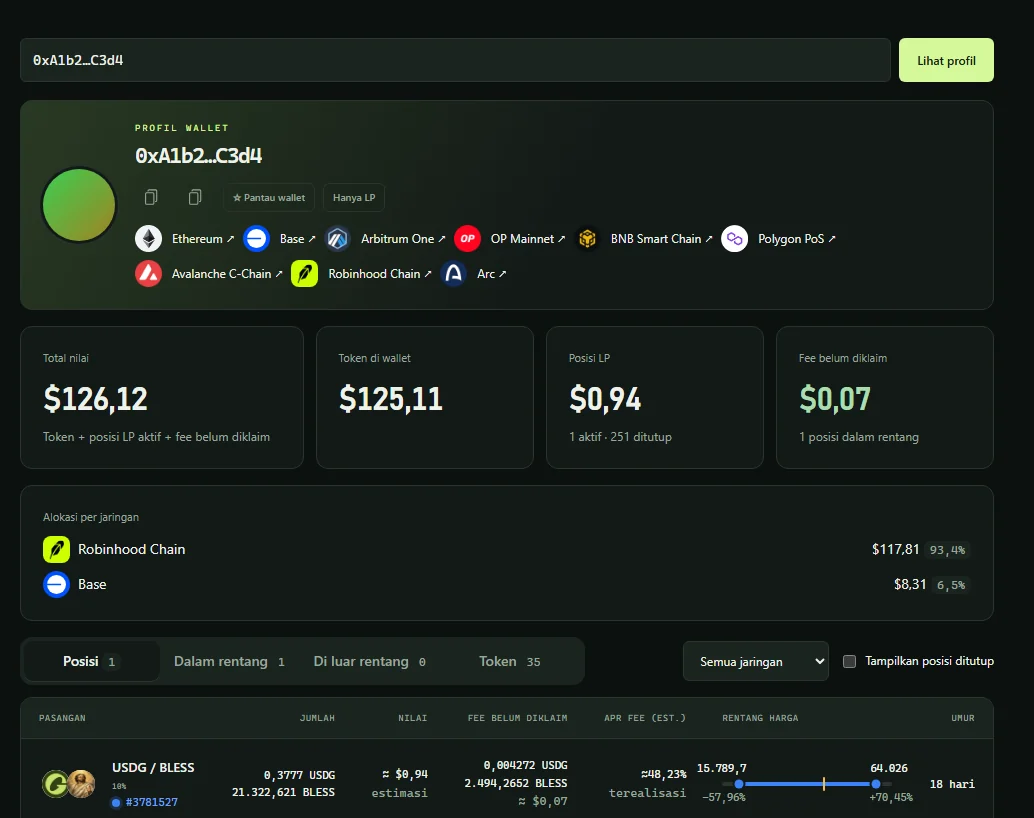
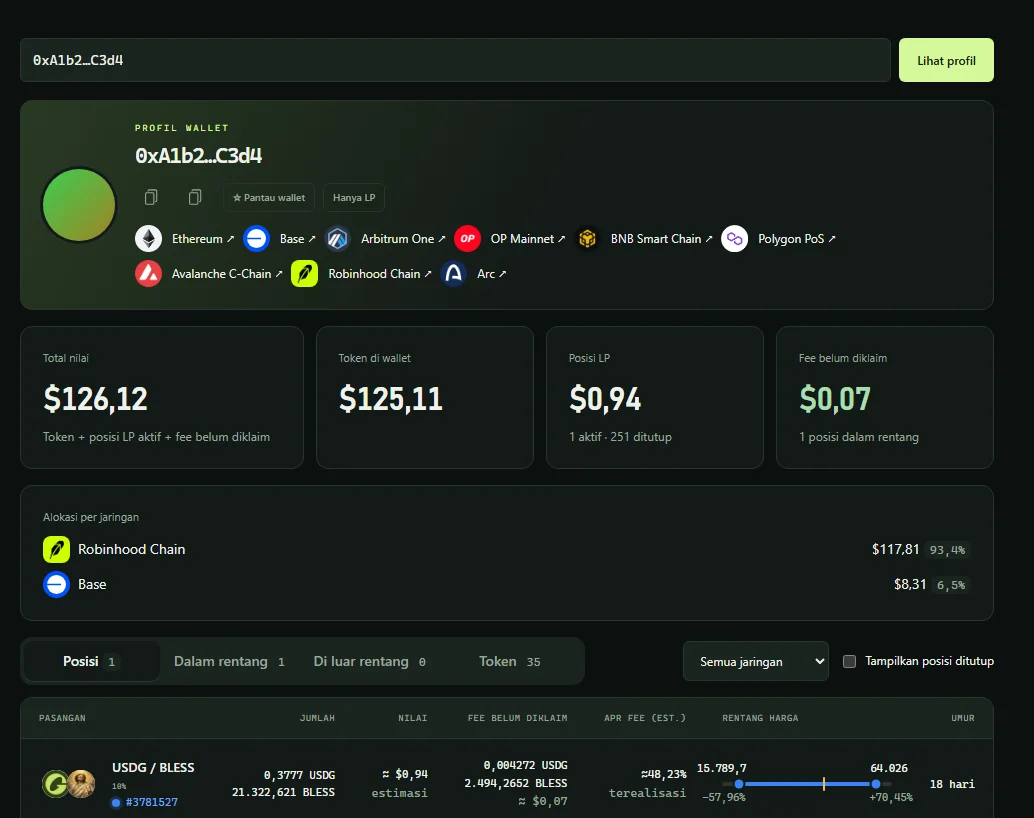
- The profile shows Total value, Wallet tokens, LP positions, Unclaimed fees and Allocation by network.
Use the Positions, In range, Out of range and Tokens tabs, plus a network filter. ☆ Watch wallet saves it to your watchlist — handy for following "smart money" wallets.
Reading the positions table
Each row shows the pair, token amounts, value, unclaimed fees, estimated fee APR, the price range with a current-price marker, and position age. A "—" value means an asset without a price, not zero.
Position details and PnL
Click a position number to see:
- position value, unclaimed fees, and PnL (profit/loss including fees);
- Deposited — total capital that went into the position;
- estimated fee APR, price-range chart and liquidity composition;
- on Solana: account rent refunded on close, and the value "if closed now".
Owners can add, remove, claim fees or compound right there — see how to claim fees and remove liquidity.
Closed positions
Tick Show closed positions for a separate table: tokens and fees withdrawn at close, total value, fee APR, range, age, close date and network. History is stored server-side so profiles load fast even with hundreds of positions; older Solana positions are backfilled gradually from transaction history.
Daily and monthly PnL
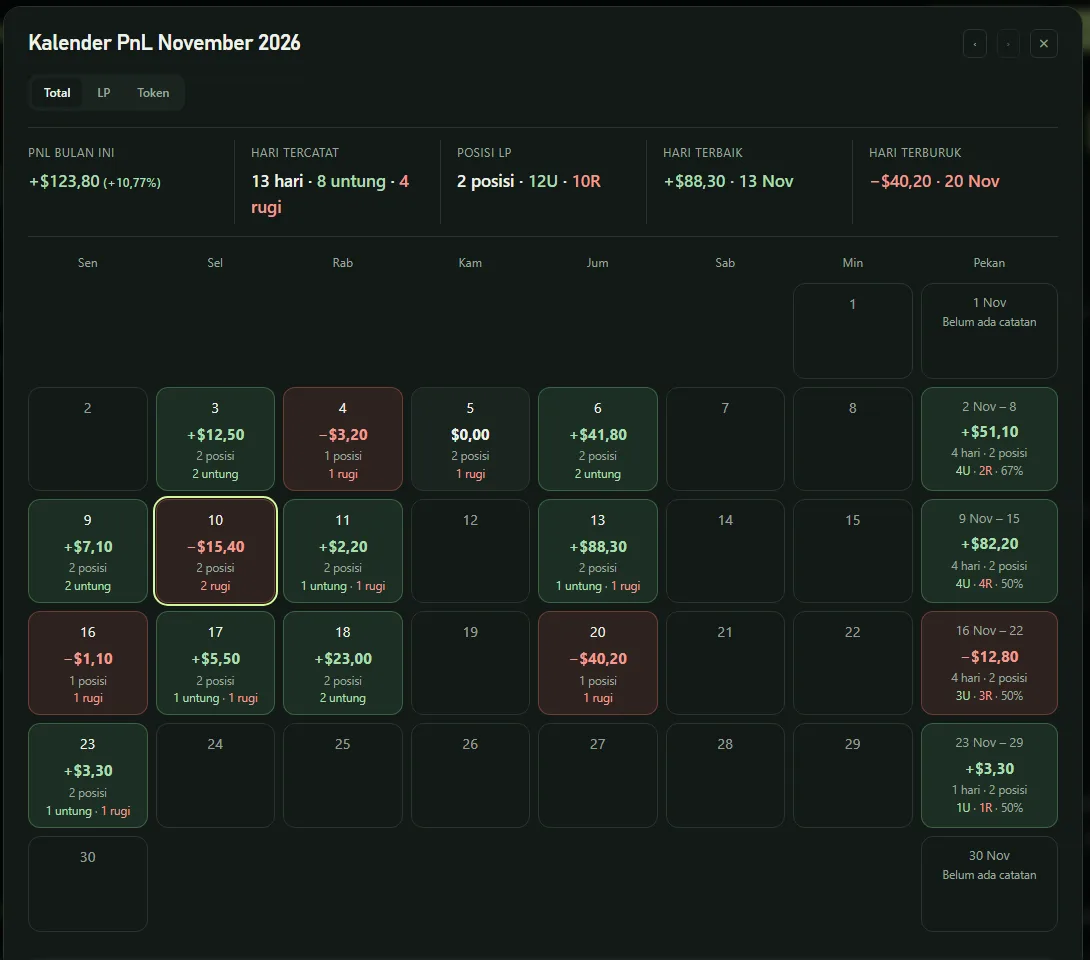
For profit and loss per day, use the PnL calendar on the same profile.
FAQ
Is it safe to enter a wallet address on BaniPool?
Yes. Wallet addresses are public blockchain data. Viewing a profile needs no signature and gives no access to funds.
Why is my position missing?
Make sure the network and DEX are supported. Older Solana positions may still be backfilling; reload a few minutes later.
What does "out of range" mean?
The pool price is outside the position's range, so it earns no fees until the price returns or you rebalance.